

Printing from Netscape Navigator 3 & 4:
Close this window to return to the site
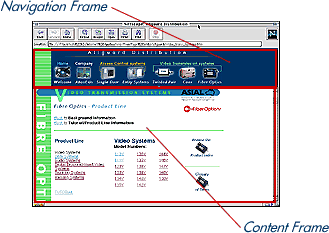
To print out the text and photos/diagrams within any page, right click with your mouse (click and hold if you are using a Mac) within the content frame (see below) and select "New Window with this Frame". The content frame will open up in a new window. From there go to "FIle" menu and select "Print".
Printing from Netscape Navigator 2 and Internet Explorer :
To print out the text and photos/diagrams within any page, click once anywhere in the content frame, then go to the "File" menu and select "Print".

Close this window to return to the
site